
Free delivery across India · Handcrafted marble home décor · GST invoice with every order

WordPress plugin
Image Hotspot Pro
Image Hotspot Pro links marked points on images, maps, and video content to related information. Visitors can hover over or click a marker to open a tooltip or pop-up with text, images, videos, or links. YouTube and Vimeo videos can appear on your website, and embedded code can add video or map content to a hotspot.
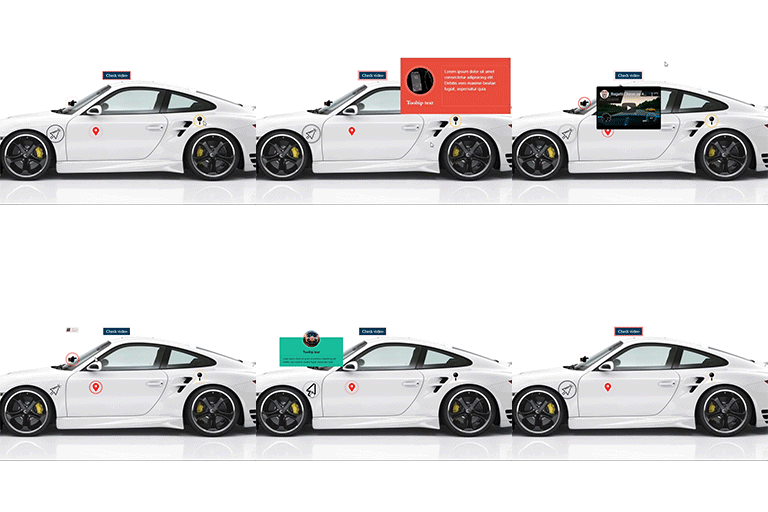
Image Hotspot Pro links marked points on images, maps, and video content to related information. Visitors can hover over or click a marker to open a tooltip or pop-up with text, images, videos, or links. YouTube and Vimeo videos can appear on your website, and embedded code can add video or map content to a hotspot.
Use this layout when a visual needs labels or explanations: identify product parts, mark places on a map, explain a diagram, or add context to an infographic. Hotspots can also make an image into a content exploration activity or interactive assessment.
Markers and their controls
Choose a Font Awesome icon, a custom image or icon, or a text label for each pointer. The built-in Font Awesome library includes more than 1,600 icons. Icon controls include color, hover color, size, and a hover icon. Custom image or icon pointers have size controls and can use a separate hover image or icon. Text pointers have font size, font color, and background color options.
Marker positions are draggable. You can edit or remove markers and select whether a user opens their content on hover or click. For tooltip content, choose a built-in template or make a custom template with HTML and CSS. Links can open in a new tab. Custom CSS can also adjust the presentation.
Placement and setup
Image Hotspot Pro supports posts, pages, widgets, current themes, and page builders. Use shortcodes to place layouts where they fit; you can create unlimited shortcodes and use multiple instances on a page. The add-on is responsive for mobile devices.
- Install and activate Image Hotspot Pro in WordPress.
- Create an image hotspot layout and add the image or visual to annotate.
- Add pointers using icons, custom images, or text.
- Set pointer styling, choose hover or click behavior, and add tooltip, embedded, or custom content.
- Place the layout in a post, page, widget, theme area, or page-builder layout with a shortcode.
Use custom CSS if you need further presentation adjustments.


